
Report Options presets
Report Options presets are stored configurations which you can use to quickly configure the Options and Additional Net Partners settings when generating a result set report.
Note: A Currency & Discounting preset selection is stored in each Report Options preset (see Currency and Discounting presets). When a Report Options preset is active you can only change the Currency & Discounting preset by editing the Report Options preset.
The presets are shared by Economics users in the same tenant, and access is controlled by permissions on each preset; see below for details.
Using a Report Options Preset
If the Report Options Preset field in set to blank then no preset will be used. You can edit all of the input fields for Options and Additional Net Partners (see Result Set Reports for details).
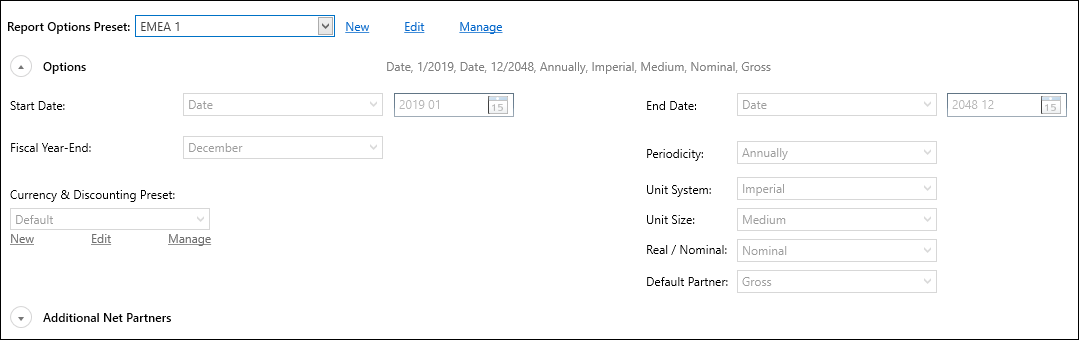
When a preset has been selected from the drop-down menu, the input fields are fixed (and grayed out) based on the contents of the preset. For example:
Editing a preset
If you click the Edit button then all of the fields can be edited. Then click Save to save the edits into the preset, or click Discard Changes to cancel your edits.
Creating a new preset
To create a new preset, click New to open the New Report Options Preset dialog.
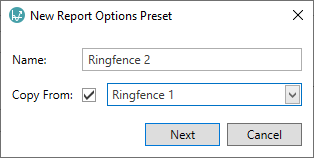
Enter a Name for the preset. To copy settings from an existing preset, check Copy From and use the drop-down menu to select a preset. Click OK to close the dialog and create the preset. Now use Edit to open the preset for editing and make changes as necessary.
Managing Report Options Presets
If you click Manage you will open a dialog containing a list of the stored presets, which you can use to Rename or Delete a preset.
Permissions
You can use the Permissions button in the Manage dialog to edit the permissions for a preset.
When a preset is created, 'Full Access' permissions are granted to the user who created the preset (and to Administrator users). No other users or workgroups are granted permissions by default.